
I got my HP Omen gaming laptop's thermal paste changed and deep cleaned here. The service was super good and quick, done within an hour! 🚀 They even gave me tips on laptop care. The price was reasonable at 1200Rs, and they use quality thermal paste too. Highly recommend! 👍😊💻 …
Hot to touch · fan loud · slows down under load · shuts off when gaming
Overheating, noisy fans and heat shutdowns
Dust blocks the fins, thermal paste dries out, and the laptop protects itself by slowing down or switching off. A thermal paste change and deep clean fixes most of it. A fan that rattles or has stopped is replaced.
10am–8pm, Mon–Sat · Whitefield Main Road, opposite Dress Circle Mall · free pickup nearby
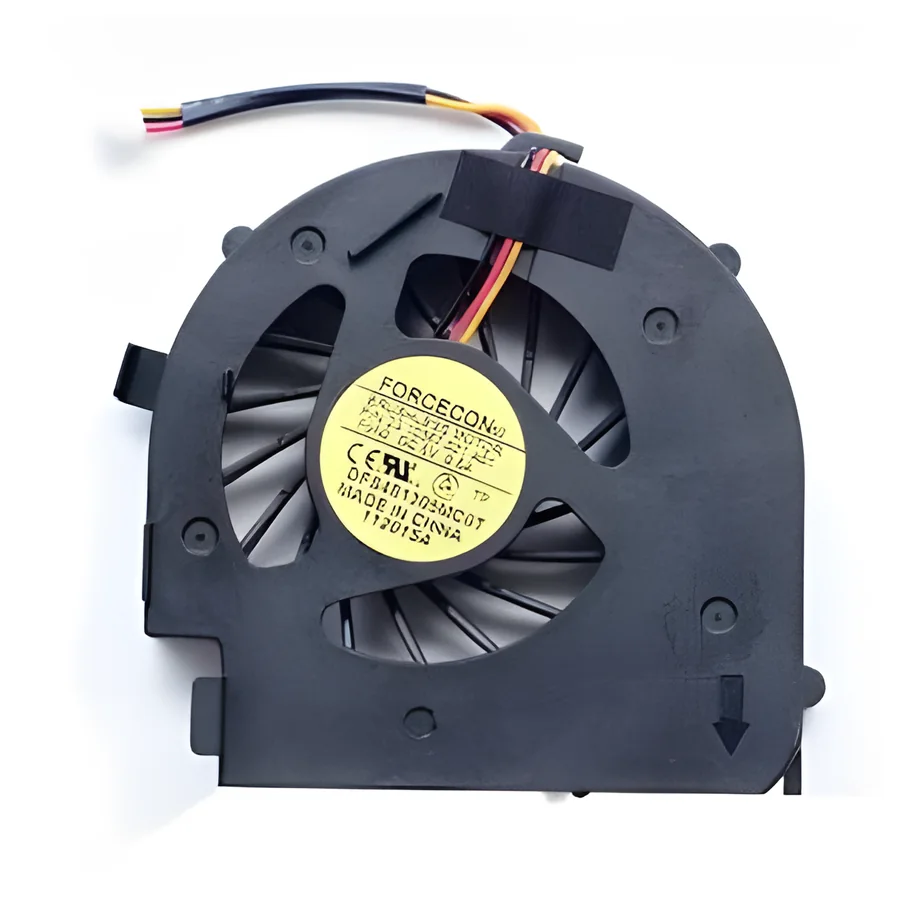
- Fan
- Heat pipe
- Fins
- Thermal paste
Quick answer
A laptop that runs hot, gets loud and then slows down is throttling: the processor lowers its speed to stay under its temperature limit. The cause is nearly always dust in the fins and old thermal paste, sometimes a fan that has stopped. Cleaning and re-pasting restores performance; you will notice the difference the same day.
Symptoms this covers
- Base or keyboard uncomfortably hot
- Fan running loud constantly, or rattling
- Games or video calls slow to a crawl after ten minutes
- Shuts down or restarts under load
- Fan completely silent while the laptop is hot (fan stopped)
Likely causes, in plain words
- CommonDust packed in the heatsink fins
- Bengaluru dust builds a felt-like layer between fan and fins. Air stops flowing.
- CommonDried thermal paste
- After two to three years the paste between chip and heatsink hardens and heat cannot cross. Re-pasting restores it.
- SometimesFan failure
- Bearings wear (rattle) or the fan stops entirely. Replaced as a unit. Fan noise explained
- SometimesBlocked vents from use on beds and sofas
- Soft surfaces seal the intake. Free fix: a hard surface or a stand.
- RareSoftware keeping the processor busy
- A stuck process or malware can run the chip at full tilt. We check before opening. Overheating causes
How we diagnose it
- We log temperatures at idle and under load before touching anything.
- We open the laptop, inspect the fan, fins and paste, and check the fan spins freely.
- We deep clean, re-paste with a quality compound, and replace the fan if needed.
- We log temperatures again and show you both readings.
Repair options
Thermal paste change and deep clean
Full disassembly to the heatsink, dust cleared from fins and fan, fresh paste on CPU and GPU, thermal pads checked.
Fan replacement
A new fan matched to your model when the bearing is gone or the fan has stopped.
Heatsink and fan assembly
On gaming laptops with dual fans and heat pipes, the whole assembly may need replacing if a pipe has failed.
What it costs
What decides the price
- Single fan vs dual-fan gaming design
- Fan only vs the whole heatsink assembly
- Ultra-thin designs that take longer to open
- Paste grade for high-power chips
- Whether cleaning alone fixes it
We quote after a free diagnosis of your specific model, in writing, before any work starts. There is no charge if you decide not to go ahead.
Repair, or replace the laptop?
Repair makes sense when
- Almost always: a thermal service is one of the best-value repairs there is
- The laptop was fast when new and has only become slow and hot
Replacement makes sense when
- Heat has already damaged the board (rare) on an old machine
Undecided? Use the repair-or-replace helper. It asks five questions and gives you a one-sentence read, not a score.
Process
How a repair works here
- 01
Diagnose
Free at the Whitefield bench. Nearby, we collect the laptop from you.
- 02
Quote
One written price for parts and labour, with what we found and why.
- 03
Approve
Nothing is opened further or ordered until you say yes.
- 04
Repair
Component-level where possible; a replacement part only when it is the honest answer.
- 05
Test
Run and checked before it leaves the bench: power, display, thermals, ports, keyboard.
- 06
Return
Collect at the workshop, or we drop it back within our pickup areas.
Real Google reviews
What customers say about this repair
My laptop used to heat up uncontrollably within just 10 minutes of gaming, which severely affected its performance. I consulted Skylab regarding this issue, and they recommended a complete laptop service. Upon inspection, they found that …
I went for my laptop fan issue. He did repair just by servicing..not by replacing..quick and excellent service
Questions people ask
Before you decide
Is it normal for a laptop fan to run all the time?
Under load, yes. At idle on a desk, no. A fan that never stops usually means the fins are blocked so the fan works harder for less air. Cleaning fixes it.
Can overheating damage my laptop?
Over time, yes: the battery ages faster, solder joints fatigue, and the machine throttles itself constantly. Thermal shutdowns are the laptop protecting itself; they are a warning, not the damage itself.
How often should thermal paste be changed?
Every two to three years for a well-used laptop, sooner for gaming machines run hot every day. If the fan is already loud or the laptop throttles, it is due now.
My gaming laptop throttles after ten minutes. Is that fixable?
Usually. Gaming laptops have the most to gain from a proper clean and re-paste, and customers with an HP Omen or Acer Predator write exactly that in their reviews. If a heat pipe or fan has failed, we replace the assembly.
Not sure which one you have?
Describe it in a sentence or send a photo. We tell you what it is before you spend anything.
Send a photo on WhatsAppKeep reading
Related
Next step
Tell us what happened. We tell you what it is and what it costs.
Free diagnosis at the Whitefield workshop, or free pickup nearby.